


Best Buy: Shop tech deals
4.783.73K Reviews
App Specs
- Version
- 26.8.12
- Updated On
- License
- Free
- Downloads
- 10,000,000+
- Developer
- Best Buy Co., Inc
- Categories
- Shopping
- Platform
- Android, iOS
Screenshots
 Analysis by AppCompare
I find the Best Buy app most useful when I already have a shopping task in mind: checking a particular device, comparing options, or planning a store visit. It puts a large tech retailer’s catalogue in a phone-friendly format, but it is still a retailer’s shop, not a neutral guide to every product on the market. That distinction matters. I’d use it to research and buy items Best Buy carries, then look elsewhere if I wanted a broad view across competing sellers.
Best Buy Co., Inc makes this free shopping app, which is suitable for everyone. Its 4.8 average from around 412,000 ratings suggests a lot of shoppers find it useful, though a high score does not guarantee that every product or purchase will suit you. With over 10 million installs, it is a familiar option for people who regularly shop for electronics. I see its main value as convenience: browsing and product research can happen before I decide whether to order or head to a store.
Shopping for tech with a clear purpose
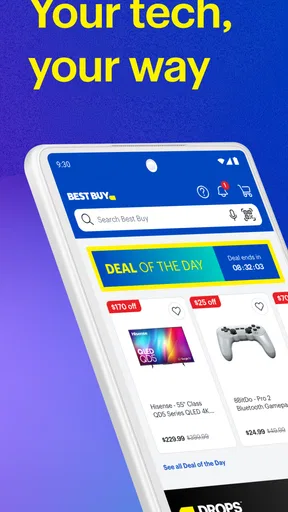
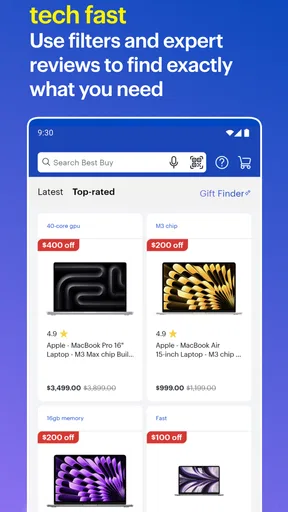
First things first, the app’s interface is super intuitive. You open it up, and bam! You’re greeted with a clean, user-friendly design that makes navigation a breeze. It’s like the app already knows what you’re looking for, thanks to its organized categories and search functionality. Whether you’re hunting for the latest smartphone or a fancy new TV, the Best Buy: Shop tech deals app has got you covered.
That organization is most helpful when I have a specific need rather than a vague urge to browse. Searching for a replacement charger, for example, is a different task from choosing a television: the first calls for a quick check of compatibility, while the second requires comparing size, features, and reviews. I’d begin with a search for the exact product or type, then narrow my shortlist before looking at the details. This keeps a sale badge from becoming the main reason I buy.
There is also a practical difference between shopping here and using a general web search. A search engine may surface several retailers and a wider spread of prices; Best Buy’s app keeps the journey focused on its own selection. That can be quicker if I want to see what this retailer offers, but it is not the best final stop for someone whose only goal is finding the lowest price across the whole internet. I treat it as a useful store-specific window, not a complete market comparison.
Deals are a prompt to compare, not a reason to rush
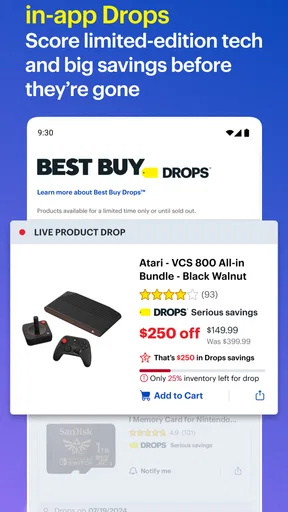
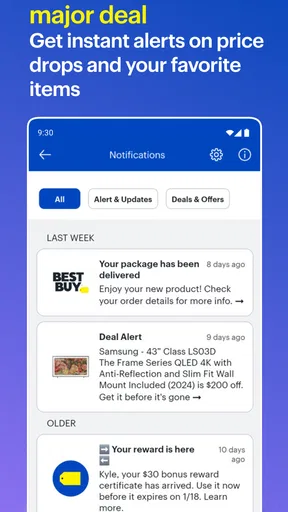
Who doesn’t like a good deal, right? Well, this app is packed with exclusive offers that you won’t find anywhere else. The daily deals section is something I check religiously, and let me tell you, it does not disappoint. From flash sales to members-only discounts, there’s always something that catches my eye. Plus, the app sends you notifications whenever there’s a price drop on items in your wishlist. It’s like having a personal shopper who’s always on the lookout for the best prices.
I’d use deal browsing with a small bit of discipline. Before reacting to a discount, I would confirm that the item is the right model and configuration, then decide whether I would still want it at its regular price. Tech products can have similar names while differing in useful details, so checking the product page is more valuable than simply seeing a lower figure. A wishlist can help keep a purchase in view, but I would treat alerts as reminders to re-evaluate, not proof that an offer is the best available anywhere.
Worth Reading Before You Choose

EA SPORTS FC Mobile 26 Is a Bigger Football Game, but It Takes Time

Flipboard Shows What News Apps Must Do Beyond the Feed

Switching to Android Auto Means Rethinking Your Driving Routine

Google Calendar Makes a Crowded Week Easier to Manage

Ludo King Makes the Most of the Minutes Between Plans

Baby Panda World Brings Quick Play to Modern Phones, but Its Game Library Feels Busy
For a realistic everyday example, imagine my headphones stop working the evening before a commute. I can search the app for a replacement, read feedback on a couple of candidates, and see what buying through Best Buy might involve before deciding whether to order or visit a store. If I am not in a rush, I can save the options and return later rather than choosing the first item that looks discounted. That workflow is where a retailer’s app earns its place: it turns an errand into a few manageable checks.
Checkout and pickup depend on the errand
Shopping through the app feels almost too easy. You can browse, compare, and purchase without ever leaving your couch. The checkout process is seamless, and you have multiple payment options, including credit cards, PayPal, and even in-store pick-up. I love the flexibility it offers, especially when I’m too lazy to wait for delivery. Just place an order and swing by your local Best Buy to pick it up. Easy peasy!
For an item I need soon, the prospect of pickup can be more useful than having a box delivered at an uncertain time. I would check the order details and store information carefully before setting out, then keep the purchase confirmation available so the handoff is straightforward. For something bulky or not needed right away, delivery may make more sense. The key trade-off is that the app can help me arrange a retailer-specific purchase, but it cannot make a store visit convenient if the nearest location is out of my way.
I would also avoid assuming that every shopping decision should end in the app. If I need to inspect an item in person, ask questions, or compare how two devices feel in my hands, browsing on a phone is only preparation. Conversely, if I already know the exact model and want to avoid wandering around, app-based research and ordering can save time. The better route depends on whether my uncertainty is about the product itself or simply how to get it.
Reviews help most when read with context
Another feature I absolutely adore is the customer reviews section. It’s like having a community of tech enthusiasts at your fingertips, sharing their honest opinions. Before making any purchase, I always skim through the reviews, and they’ve saved me from making impulse buys more times than I can count. The ratings system is straightforward, giving you a clear picture of what to expect from a product.
My useful habit is to look for comments that address my actual use rather than treating the overall score as a verdict. A complaint about a feature I never plan to use may not matter to me; a recurring issue with a feature I depend on deserves more attention. I would also compare praise and criticism instead of relying on the most enthusiastic or most frustrated review. Customer feedback can reveal how a product behaves for other owners, but it is still only one part of deciding whether it suits my needs.
This is especially important with connected devices and accessories, where compatibility can be more consequential than general popularity. Before buying, I’d check the product details against the device I already own and consider whether the reviewer is describing a similar setup. Reading with that question in mind makes reviews more actionable and reduces the chance of mistaking someone else’s circumstances for my own.
Useful for browsing, but not a neutral tech guide
Besides shopping, the app keeps you updated with the latest tech news and trends. It’s like a mini tech magazine that fits right into your smartphone. Whether it’s a new gadget release or an upcoming sale event, you’ll be in the loop. And for those of you who love to stay on top of things, this feature is a real gem.
That browsing side can be enjoyable when I want to see what is new, but I would separate discovery from decision-making. A retailer’s updates naturally sit alongside its shopping experience, so I would not use them as my only source for deciding whether a new product is genuinely right for me. If I am researching a high-cost device, I would cross-check technical needs and alternatives before committing. If I only want a quick look at what Best Buy is featuring, keeping that exploration in one app is convenient.
The app is therefore a better fit for shoppers who already consider Best Buy a place they may buy from than for people who want a retailer-independent catalogue. It is also less compelling if I rarely shop for electronics or prefer to do all comparison work on a desktop. A phone is handy for checking a product while away from home, but a larger screen can be more comfortable when I am comparing several detailed specifications side by side.
What to expect from the app over time
The app first appeared on February 8, 2010, and its current version is 25.12.20. Those details are useful context, but what matters to me day to day is whether it suits the way I shop now: focused searches, a shortlist, a check of reviews, and a deliberate decision about buying or visiting a store. I would keep it installed if those tasks come up often enough to justify having a retailer-specific shopping tool close at hand.
One sensible way to use it is to separate the stages of a purchase. I can browse when I have time, save a product I am considering, and return when I am ready to check the details again. That gives me room to notice whether I am responding to a real need or simply to a tempting offer. For an urgent replacement, I may move through those steps quickly; for an expensive purchase, taking time to compare remains the wiser choice.
Another useful boundary is to decide in advance what would make me abandon a candidate. It might be an unsuitable size, a feature I need that the product lacks, or customer feedback that points to a concern relevant to my setup. Setting that standard before browsing makes it easier to avoid being pulled toward whatever appears most prominently. The app can make product discovery convenient, but the quality of the decision still comes from knowing what I need.
There are 79,000 reviews associated with the app, and I see that as a reminder to distinguish opinions about the shopping app from opinions about the products it sells. A shopper’s experience with browsing or an order is not the same thing as an owner’s experience with a particular gadget. Keeping those two kinds of feedback separate helps me use each for the question it can actually answer.
For someone who buys tech regularly, the strongest reason to keep this app is not any single deal or screen. It is the combination of store-focused product discovery, customer feedback, and a path from browsing to a purchase or pickup. For an occasional shopper, the browser version or a broader comparison service may be enough. I would not install it expecting an unbiased guide to every brand or retailer; I would install it to make Best Buy shopping easier.
In a nutshell, the Best Buy: Shop tech deals app is a game-changer for anyone who loves tech gadgets as much as I do. It’s convenient, packed with features, and always ready to give you the best deals. So, if you haven’t downloaded it yet, what are you waiting for? Trust me, your inner tech geek will thank you.
My recommendation is more measured than that enthusiastic sign-off suggests: I’d recommend it to people who expect to shop at Best Buy and want to research products or plan a purchase from their phone. I’d skip it if I wanted a neutral comparison across retailers, rarely bought electronics, or preferred to inspect everything in person before making any decision. It is free to try, and for the right shopper its convenience is real; just use its deals and reviews as useful inputs, not substitutes for checking what you need.
Pros
- User-friendly interface with smooth navigation.
- Extensive product range across various categories.
- Real-time inventory updates prevent stock issues.
- Price match guarantee ensures competitive pricing.
- In-app exclusive deals and promotions.
Cons
- Occasional app crashes during heavy traffic.
- Limited search filter options for precise results.
- Requires strong internet for optimal performance.
- Some features locked to specific regions.
- Customer service response can be delayed.
FAQs for Best Buy: Shop tech deals
What features does the Best Buy app offer?
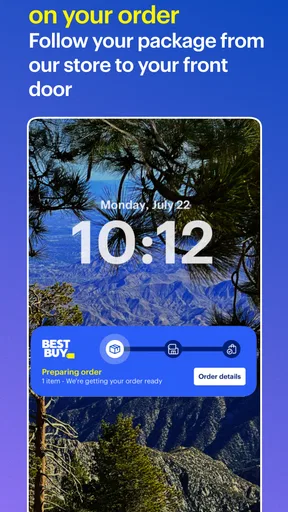
The Best Buy app provides a seamless shopping experience with features like searching for products, reading reviews, checking availability, and comparing prices. It also includes options to purchase directly, track orders, and manage your account. Additionally, users can access exclusive deals and use the app for easy in-store pickup.
Is the Best Buy app free to use?
Yes, the Best Buy app is free to download and use on both Android and iOS devices. While the app itself doesn’t require any purchase, keep in mind that buying products through the app will, of course, involve costs. Users can also join the rewards program for additional benefits.
How secure is the Best Buy app for making purchases?
The Best Buy app is designed with security in mind, employing encryption and secure login features to protect user data. Users are encouraged to use strong passwords and enable two-factor authentication for added security. Payments are processed securely, ensuring your financial information remains safe.
Can I access my Best Buy account and rewards through the app?
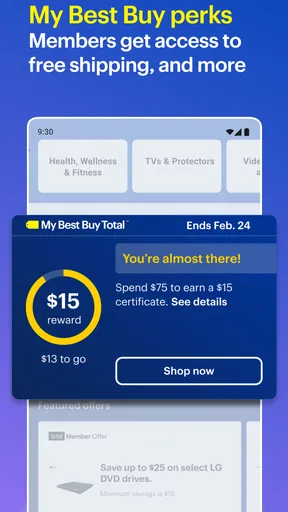
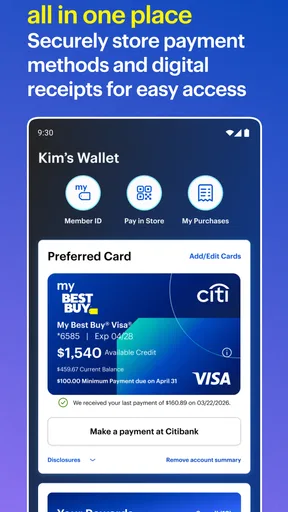
Absolutely. The Best Buy app allows users to log into their accounts to view purchase history, manage payment methods, and access rewards. Members of the My Best Buy program can track points, view exclusive offers, and redeem rewards directly through the app, enhancing the shopping experience.
Does the Best Buy app offer customer support?
Yes, the app provides access to customer service through various channels. Users can chat with support, call customer service, or find answers to common questions in the app's help section. The app also offers store locator features to assist with in-person inquiries at nearby Best Buy locations.


